

Verify Your Dr. Pen Product
How to Verify Your Dr. Pen Product
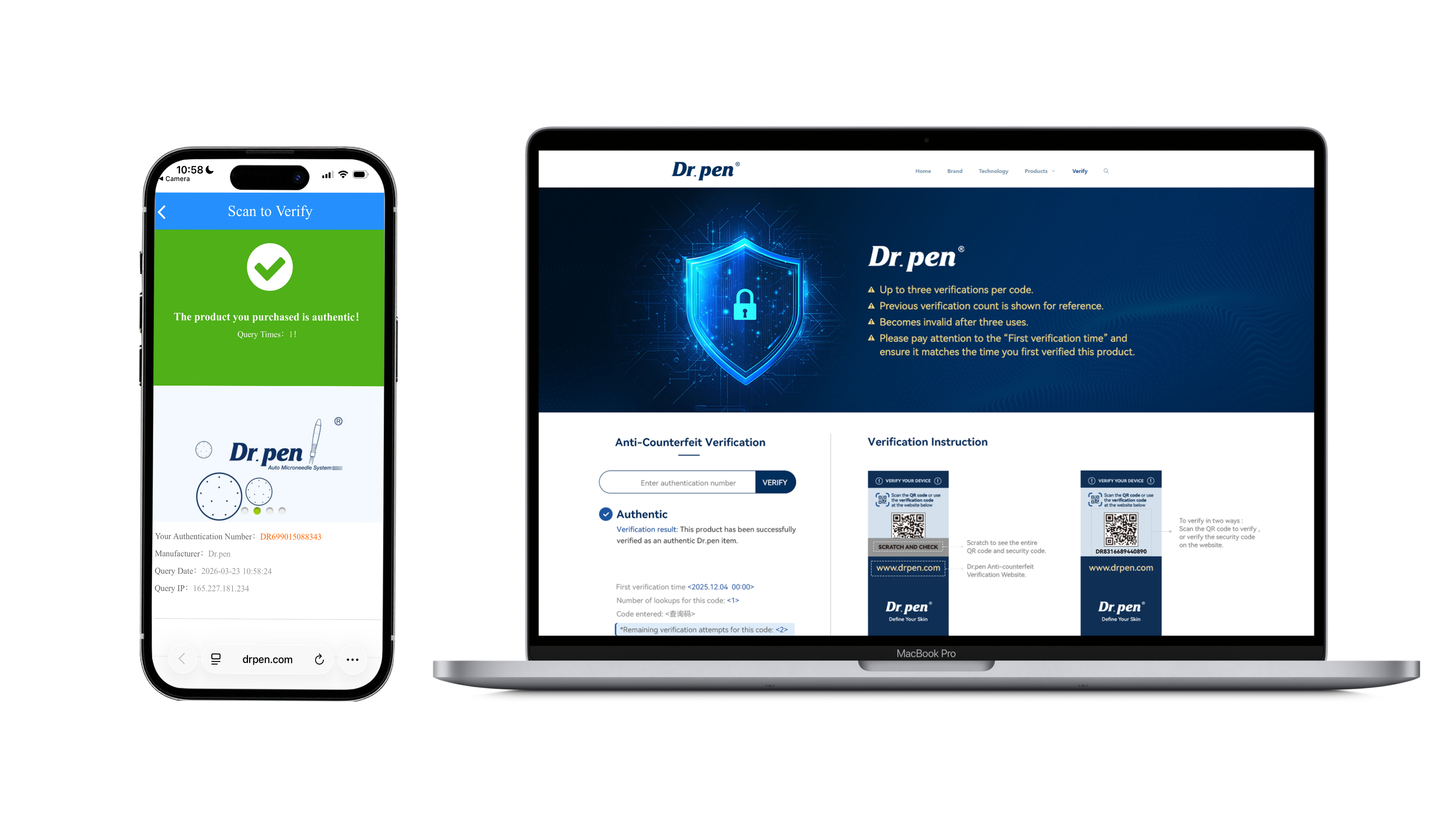
Click here to visit the Dr.pen brand showcase website open the Dr. Pen authenticity check page. Find the anti-counterfeit security label on your product packaging, scan the QR code, or enter the verification code manually to confirm whether your Dr. Pen product is genuine.
If the verification result is unusual or the code cannot be verified, please contact Dr. Pen support with your product photos, packaging photos, and purchase details.
Step 1
Find the security label
Locate the anti-counterfeit label on your Dr. Pen product packaging.
Step 2
Scan the QR code or enter the code
Use your mobile phone to scan the QR code, or manually enter the anti-counterfeit code on the official Dr. Pen authenticity check page.
Step 3
Check the verification result
If your product is genuine, the system will show a successful verification result.
Step 4
Contact support if needed
If the code cannot be verified, has already been checked before, or shows an unusual result, please contact Dr. Pen support with your product photos, packaging photos, and purchase information.

Dr. Pen Authenticity Check FAQ
Learn how to verify your Dr. Pen product, understand unusual verification results, and get support if your code cannot be confirmed.
How do I verify if my Dr. Pen product is genuine?
How do I verify if my Dr. Pen product is genuine?
Go to the top navigation bar and click Support, then select Verify from the dropdown menu. On the authenticity check page, find the anti-counterfeit security label on your product packaging.
You can scan the QR code with your phone or manually enter the verification code on the page. If the product is genuine, the system should show a successful verification result.
Where can I find the anti-counterfeit code?
Where can I find the anti-counterfeit code?
The anti-counterfeit code is usually located on the security label attached to your Dr. Pen product packaging.
Please check the outer box, sealing area, or product label area carefully.
If you cannot find the label, take clear photos of the full product box, barcode area, and any stickers on the packaging, then contact
Marketing@drpen.com for support.
What should I do if my verification code does not work?
What should I do if my verification code does not work?
First, make sure the code was entered correctly. Check for confusing characters such as 0 and O, or 1 and I. If you scanned the QR code, try entering the code manually.
If the code still cannot be verified, email
Marketing@drpen.com with your product photos, packaging photos, verification code, order number, and purchase channel.
What does it mean if my code has already been verified before?
What does it mean if my code has already been verified before?
A code that has already been checked before may mean the product was previously verified, the packaging was opened before, or the code may need further review.
Do not ignore this result. Please contact
Marketing@drpen.com and include a screenshot of the verification result, the code, product photos, packaging photos, and proof of purchase.
Can I verify a Dr. Pen product purchased from another marketplace or seller?
Can I verify a Dr. Pen product purchased from another marketplace or seller?
You can try verifying the product using the anti-counterfeit code on the packaging. However, support options may vary if the product was purchased from another marketplace, reseller, or third-party seller.
For the clearest authenticity, warranty, and after-sales support, we recommend purchasing directly from drpenofficial.com.
What information should I send to support if the result looks unusual?
What information should I send to support if the result looks unusual?
Please email
Marketing@drpen.com and include:
• A photo of the full product box
• A close-up photo of the anti-counterfeit label
• A screenshot of the verification result
• Your order number, if available
• The purchase website or seller name
• A copy or screenshot of your proof of purchase
This helps our support team review your case faster.
Does a successful verification result guarantee the product is safe for everyone?
Does a successful verification result guarantee the product is safe for everyone?
No. Authenticity verification only helps confirm whether the product code appears genuine. It does not mean microneedling is suitable for every person or every skin condition.
Before use, read the product instructions carefully. Do not use microneedling on irritated, infected, broken, or actively inflamed skin. If you are unsure whether microneedling is suitable for your skin, consult a qualified skincare professional before starting.
What should I do if my product has no security label?
What should I do if my product has no security label?
If your product packaging does not have a visible security label, do not use the product until you have checked with support.
Email
Marketing@drpen.com with clear photos of the product, packaging, barcode, and purchase receipt. Our team can help review the information and advise the next step.
Can fake products look similar to genuine Dr. Pen products?
Can fake products look similar to genuine Dr. Pen products?
Yes. Some third-party or counterfeit products may look similar in photos or packaging. That is why checking the anti-counterfeit label, purchase source, product packaging, and order details is important.
To reduce risk, buy directly from drpenofficial.com and keep your order confirmation for future support.
Who should I contact for authenticity support?
Who should I contact for authenticity support?
For authenticity questions, unusual verification results, missing security labels, or purchase-source concerns, contact Dr. Pen support at
Marketing@drpen.com.
Please include your product photos, packaging photos, verification code, verification result screenshot, and proof of purchase so the team can review your case efficiently.

